内置节点参考
Kling Start-End Frame to Video - ComfyUI 原生节点文档
使用Kling的AI技术创建从起始帧到结束帧平滑过渡的视频
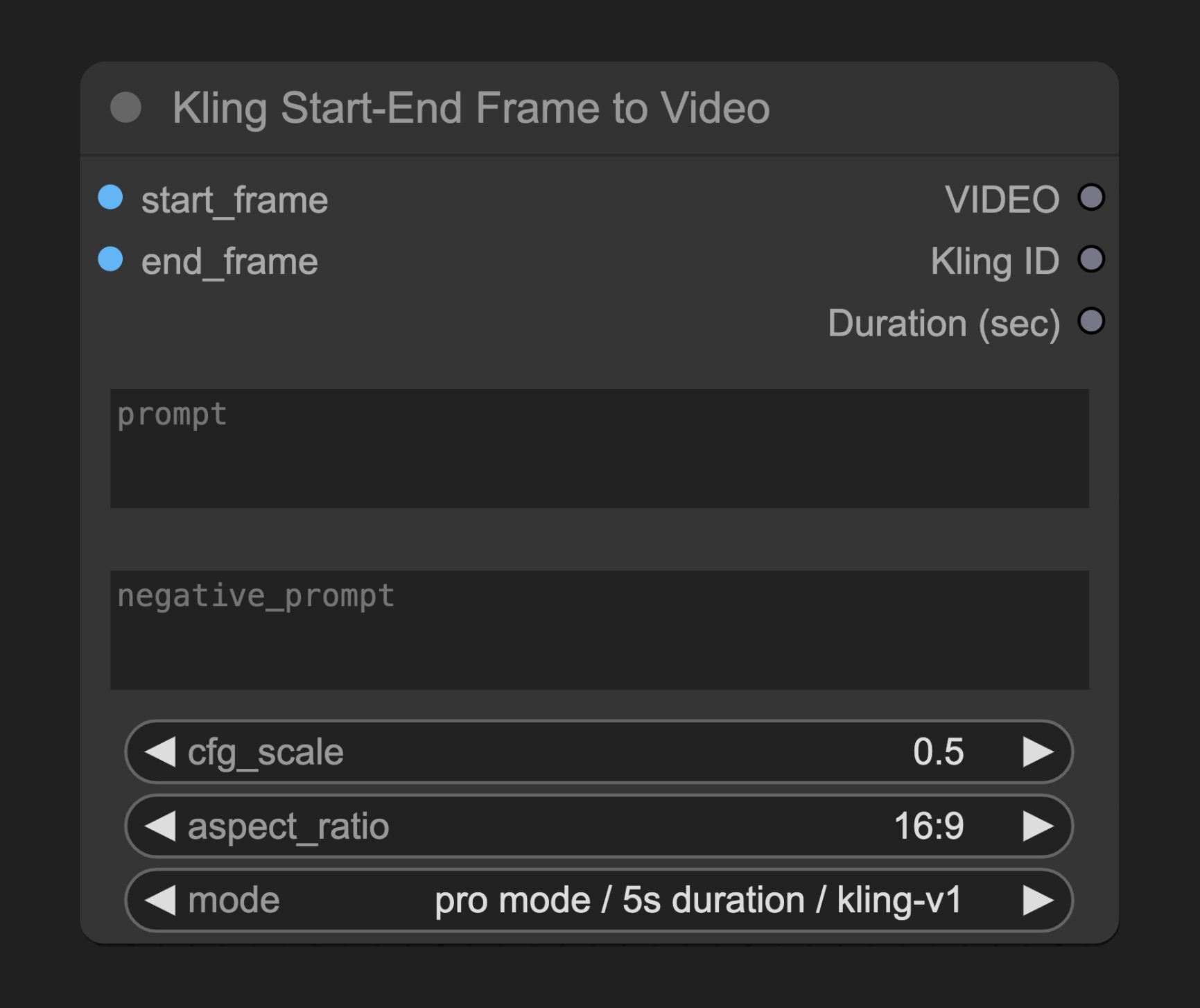
Kling Start-End Frame to Video 节点允许你提供开始和结束图像,生成在两者之间平滑过渡的视频序列。该节点会自动创建所有中间帧,产生流畅的变换效果。
参数说明
必需参数
| 参数 | 类型 | 说明 |
|---|---|---|
| start_frame | 图像 | 视频的起始帧图像 |
| end_frame | 图像 | 视频的结束帧图像 |
| prompt | 字符串 | 描述视频内容和过渡效果的文本提示词 |
| negative_prompt | 字符串 | 指定不希望在视频中出现的元素 |
| cfg_scale | 浮点数 | 配置缩放值,控制对提示词的遵循程度 |
| aspect_ratio | 选择项 | 输出视频的宽高比 |
| mode | 选择项 | 视频生成配置,格式为"模式/时长/模型名称" |
Mode 选项
节点支持以下模式选项:
- standard mode / 5s duration / kling-v1
- standard mode / 5s duration / kling-v1-5
- pro mode / 5s duration / kling-v1
- pro mode / 5s duration / kling-v1-5
- pro mode / 5s duration / kling-v1-6
- pro mode / 10s duration / kling-v1-5
- pro mode / 10s duration / kling-v1-6
默认值为 "pro mode / 5s duration / kling-v1"
输出
| 输出 | 类型 | 说明 |
|---|---|---|
| VIDEO | 视频 | 生成的视频结果 |
工作原理
Kling Start-End Frame to Video 节点分析起始帧和结束帧图像,然后创建连接这两个状态的平滑过渡序列。节点将图像和参数发送到Kling的API服务器,后者生成所有必要的中间帧,创建流畅的变换效果。
可以通过提示词引导过渡效果的风格和内容,而负面提示词则帮助避免不需要的元素。
源码参考
[节点源码 (更新于2025-05-03)]
class KlingStartEndFrameNode(KlingImage2VideoNode):
    """
    Kling First Last Frame Node. This node allows creation of a video from a first and last frame. It calls the normal image to video endpoint, but only allows the subset of input options that support the `image_tail` request field.
    """

    @staticmethod
    def get_mode_string_mapping() -> dict[str, tuple[str, str, str]]:
        """
        Returns a mapping of mode strings to their corresponding (mode, duration, model_name) tuples.
        Only includes config combos that support the `image_tail` request field.
        """
        return {
            "standard mode / 5s duration / kling-v1": ("std", "5", "kling-v1"),
            "standard mode / 5s duration / kling-v1-5": ("std", "5", "kling-v1-5"),
            "pro mode / 5s duration / kling-v1": ("pro", "5", "kling-v1"),
            "pro mode / 5s duration / kling-v1-5": ("pro", "5", "kling-v1-5"),
            "pro mode / 5s duration / kling-v1-6": ("pro", "5", "kling-v1-6"),
            "pro mode / 10s duration / kling-v1-5": ("pro", "10", "kling-v1-5"),
            "pro mode / 10s duration / kling-v1-6": ("pro", "10", "kling-v1-6"),
        }

    @classmethod
    def INPUT_TYPES(s):
        modes = list(KlingStartEndFrameNode.get_mode_string_mapping().keys())
        return {
            "required": {
                "start_frame": model_field_to_node_input(
                    IO.IMAGE, KlingImage2VideoRequest, "image"
                ),
                "end_frame": model_field_to_node_input(
                    IO.IMAGE, KlingImage2VideoRequest, "image_tail"
                ),
                "prompt": model_field_to_node_input(
                    IO.STRING, KlingImage2VideoRequest, "prompt", multiline=True
                ),
                "negative_prompt": model_field_to_node_input(
                    IO.STRING,
                    KlingImage2VideoRequest,
                    "negative_prompt",
                    multiline=True,
                ),
                "cfg_scale": model_field_to_node_input(
                    IO.FLOAT, KlingImage2VideoRequest, "cfg_scale"
                ),
                "aspect_ratio": model_field_to_node_input(
                    IO.COMBO,
                    KlingImage2VideoRequest,
                    "aspect_ratio",
                    enum_type=AspectRatio,
                ),
                "mode": (
                    modes,
                    {
                        "default": modes[2],
                        "tooltip": "The configuration to use for the video generation following the format: mode / duration / model_name.",
                    },
                ),
            },
            "hidden": {"auth_token": "AUTH_TOKEN_COMFY_ORG"},
        }

    DESCRIPTION = "Generate a video sequence that transitions between your provided start and end images. The node creates all frames in between, producing a smooth transformation from the first frame to the last."

    def parse_inputs_from_mode(self, mode: str) -> tuple[str, str, str]:
        """Parses the mode input into a tuple of (model_name, duration, mode)."""
        return KlingStartEndFrameNode.get_mode_string_mapping()[mode]

    def api_call(
        self,
        start_frame: torch.Tensor,
        end_frame: torch.Tensor,
        prompt: str,
        negative_prompt: str,
        cfg_scale: float,
        aspect_ratio: str,
        mode: str,
        auth_token: Optional[str] = None,
    ):
        mode, duration, model_name = self.parse_inputs_from_mode(mode)
        return super().api_call(
            prompt=prompt,
            negative_prompt=negative_prompt,
            model_name=model_name,
            start_frame=start_frame,
            cfg_scale=cfg_scale,
            mode=mode,
            aspect_ratio=aspect_ratio,
            duration=duration,
            end_frame=end_frame,
            auth_token=auth_token,
        )
官方原文
本页来自 Comfy-Org 官方中文文档的固定版本,并转换为 xueai 静态页面。内容以官方持续更新的页面为准。