节点与集成
LangChain Code
Use the LangChain Code node to import LangChain. This means if there is functionality you need that n8n hasn't created a node for, you can still use it. By configuring the LangChain Code node connectors you can use it as a normal node, root node or sub-node.
On this page, you'll find the node parameters, guidance on configuring the node, and links to more resources.
Node parameters
Add Code
Add your custom code. Choose either Execute or Supply Data mode. You can only use one mode.
Unlike the Code node, the LangChain Code node doesn't support Python.
- Execute: use the LangChain Code node like n8n's own Code node. This takes input data from the workflow, processes it, and returns it as the node output. This mode requires a main input and output. You must create these connections in Inputs and Outputs.
- Supply Data: use the LangChain Code node as a sub-node, sending data to a root node. This uses an output other than main.
By default, you can't load built-in or external modules in this node. Self-hosted users can enable built-in and external modules.
Inputs
Choose the input types.
The main input is the normal connector found in all n8n workflows. If you have a main input and output set in the node, Execute code is required.
Outputs
Choose the output types.
The main output is the normal connector found in all n8n workflows. If you have a main input and output set in the node, Execute code is required.
Node inputs and outputs configuration
By configuring the LangChain Code node connectors (inputs and outputs) you can use it as an app node, root node or sub-node.
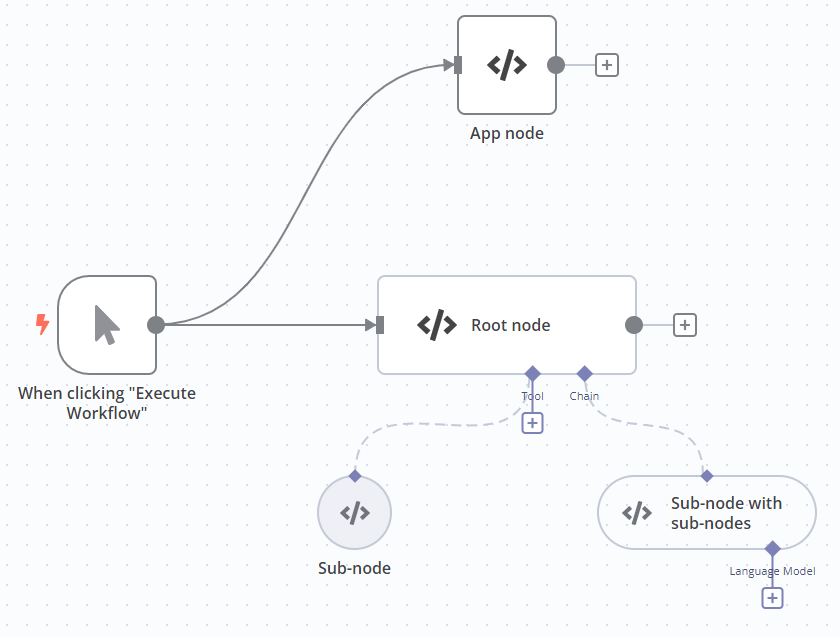
| Node type | Inputs | Outputs | Code mode |
|---|---|---|---|
| App node. Similar to the Code node. | Main | Main | Execute |
| Root node | Main; at least one other type | Main | Execute |
| Sub-node | - | A type other than main. Must match the input type you want to connect to. | Supply Data |
| Sub-node with sub-nodes | A type other than main | A type other than main. Must match the input type you want to connect to. | Supply Data |
Built-in methods
n8n provides these methods to make it easier to perform common tasks in the LangChain Code node.
| Method | Description |
|---|---|
this.addInputData(inputName, data) |
Populate the data of a specified non-main input. Useful for mocking data.<code>inputName</code> is the input connection type, and must be one of: <code>ai\_agent</code>, <code>ai\_chain</code>, <code>ai\_document</code>, <code>ai\_embedding</code>, <code>ai\_languageModel</code>, <code>ai\_memory</code>, <code>ai\_outputParser</code>, <code>ai\_retriever</code>, <code>ai\_textSplitter</code>, <code>ai\_tool</code>, <code>ai\_vectorRetriever</code>, <code>ai\_vectorStore</code><code>data</code> contains the data you want to add. Refer to Data structure for information on the data structure expected by n8n. |
this.addOutputData(outputName, data) |
Populate the data of a specified non-main output. Useful for mocking data.<code>outputName</code> is the input connection type, and must be one of: <code>ai\_agent</code>, <code>ai\_chain</code>, <code>ai\_document</code>, <code>ai\_embedding</code>, <code>ai\_languageModel</code>, <code>ai\_memory</code>, <code>ai\_outputParser</code>, <code>ai\_retriever</code>, <code>ai\_textSplitter</code>, <code>ai\_tool</code>, <code>ai\_vectorRetriever</code>, <code>ai\_vectorStore</code><code>data</code> contains the data you want to add. Refer to Data structure for information on the data structure expected by n8n. |
this.getInputConnectionData(inputName, itemIndex, inputIndex?) |
Get data from a specified non-main input.<code>inputName</code> is the input connection type, and must be one of: <code>ai\_agent</code>, <code>ai\_chain</code>, <code>ai\_document</code>, <code>ai\_embedding</code>, <code>ai\_languageModel</code>, <code>ai\_memory</code>, <code>ai\_outputParser</code>, <code>ai\_retriever</code>, <code>ai\_textSplitter</code>, <code>ai\_tool</code>, <code>ai\_vectorRetriever</code>, <code>ai\_vectorStore</code><code>itemIndex</code> should always be <code>0</code> (this parameter will be used in upcoming functionality)Use <code>inputIndex</code> if there is more than one node connected to the specified input. |
this.getInputData(inputIndex?, inputName?) |
Get data from the main input. |
this.getNode() |
Get the current node. |
this.getNodeOutputs() |
Get the outputs of the current node. |
this.getExecutionCancelSignal() |
Use this to stop the execution of a function when the workflow stops. In most cases n8n handles this, but you may need to use it if building your own chains or agents. It replaces the Cancelling a running LLMChain code that you'd use if building a LangChain application normally. |
Templates and examples
Browse LangChain Code node documentation integration templates or search all templates
Related resources
View n8n's Advanced AI documentation.
官方原文和授权
本页来自 N8N 英文官方网站固定快照,并转换成 xueai 静态页面。内容以 N8N 持续更新的官方页面为准。