API、CLI 与扩展
Troubleshooting
Credentials
Error message: 'Credentials of type "\*" aren't known'
Check that the name in the credentials array matches the name used in the property name of the credentials' class.
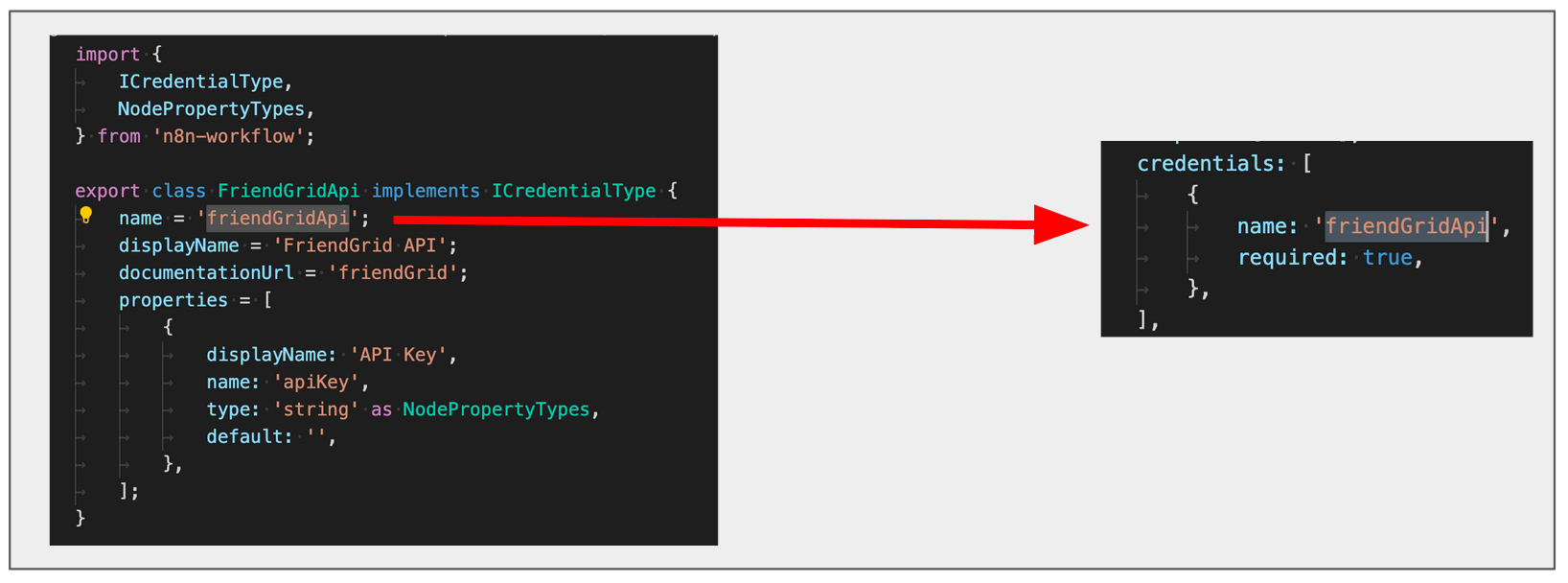
Editor UI
Error message: 'There was a problem loading init data: API-Server can not be reached. It's probably down'
- Check that the names of the node file, node folder, and class match the path added to
packages/nodes-base/package.json. - Check that the names used in the
displayOptionsproperty are names used by UI elements in the node.
Node icon doesn't show up in the Add Node menu and the Editor UI
- Check that the icon is in the same folder as the node.
- Check that it's either in PNG or SVG format.
- When the
iconproperty references the icon file, check that it includes the logo extension (.pngor.svg) and that it prefixes it withfile:. For example,file:friendGrid.pngorfile:friendGrid.svg.
Node icon doesn't fit
- If you use an SVG file, make sure the canvas size is square. You can find instructions to change the canvas size of an SVG file using GIMP here.
- If you use a PNG file, make sure that it's 60x60 pixels.
Node doesn't show up in the Add Node menu
Check that you registered the node in the package.json file in your project.
Changes to the description properties don't show in the UI on refreshing
Every time you change the description properties, you have to stop the current n8n process (ctrl + c) and run it again. You may also need to re-run npm link.
Linter incorrectly warning about file name case
The node linter has rules for file names, including what case they should be. Windows users may encounter an issue when renaming files that causes the linter to continue giving warnings, even after you rename the files. This is due to a known Windows issue with changing case when renaming files.
官方原文和授权
本页来自 N8N 英文官方网站固定快照,并转换成 xueai 静态页面。内容以 N8N 持续更新的官方页面为准。