开始使用
Choose how to use n8n
n8n offers two primary deployment options: n8n Cloud (fully-managed) and Self-hosted (deploy on your own infrastructure). Choosing involves two decisions:
- Cloud or self-hosted? Decide whether n8n manages the infrastructure or you do.
- Which plan or edition? Within each option, pick the tier that has the features and limits you need.
This page helps with both.
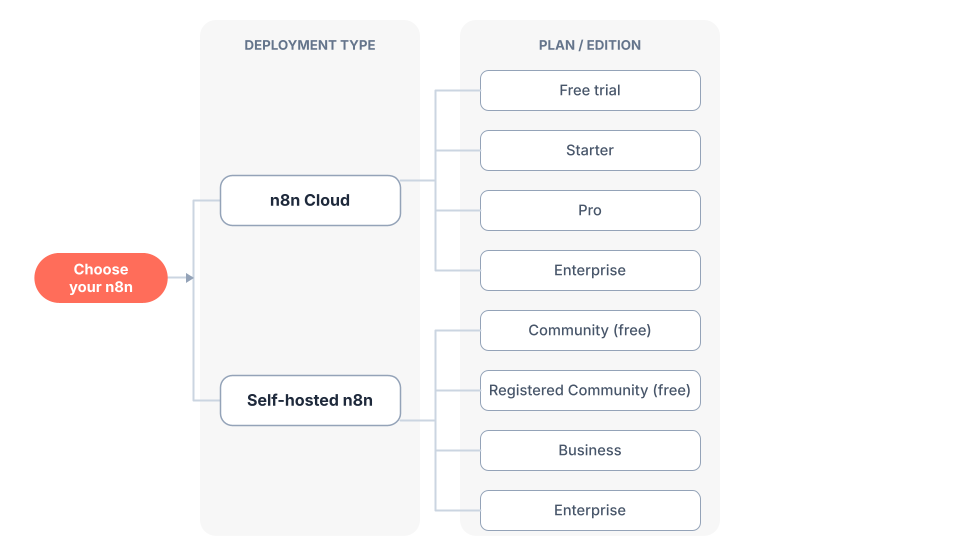
Choosing your n8n deployment option, plan, and edition
Decision 1: Cloud or self-hosted
Use this guide to choose a deployment option:
| Your situation | Recommended option | Reason |
|---|---|---|
| Want to start quickly | n8n Cloud | No installation needed |
| Don't have technical expertise | n8n Cloud | Fully managed, no setup or maintenance required |
| Need production-ready deployment | Both options work | Both Cloud and self-hosted support production use |
| Don't want to manage infrastructure | n8n Cloud | n8n handles hosting, updates, and scaling |
| Need full control over deployment | Self-hosted | You control the environment and configuration |
| Have customized use cases | Self-hosted | Full control over deployment and configuration |
| Need enterprise features (SSO, environments, projects, etc.) | Both options work | Enterprise plans (paid) are available with both |
| Have infrastructure and technical resources | Self-hosted | You can manage your own deployment |
| Want to run n8n for free | Self-hosted (Community edition) | Free with almost the complete feature set |
For specific feature availability across different plans, see the pricing page.
Pros and cons comparison
| Aspect | n8n Cloud | Self-hosted |
|---|---|---|
| Setup & Deployment | ||
| Installation | ✅ No installation needed | ❌ Requires setup (npm, Docker, or server) |
| Technical expertise | ✅ None required | ❌ Required for installation and configuration |
| Infrastructure Management | ||
| Hosting | ✅ Fully hosted by n8n | ❌ You must provide and manage infrastructure |
| Maintenance | ✅ Handled by n8n | ❌ Your responsibility |
| Control & Customization | ||
| Deployment control | ❌ Managed by n8n | ✅ Full control over deployment |
| Customization | ❌ Limited to available options | ✅ Recommended for customized use cases |
| Cost | ||
| Free option | ⚠️ Free trial available | ✅ Free Community edition with most features |
| Paid options | ✅ Range of paid plans | ✅ Paid Business and Enterprise options available |
| Features | ||
| Core features | ✅ Included | ✅ Included in free Community edition |
| Enterprise features | ❌ Requires paid plans | ❌ Requires a paid plan (free Community limited) |
| Use Cases | ||
| Quick start | ✅ Ideal for getting started | ⚠️ Takes longer to set up |
| Production use | ✅ Supported | ✅ Recommended for production |
| Custom requirements | ⚠️ Limited customization | ✅ Recommended for customized use cases |
Legend: ✅ Advantage | ❌ Disadvantage | ⚠️ Mixed/depends on needs
For specific feature availability across different plans, see the pricing page.
Decision 2: Choose a plan or edition
Once you've chosen a deployment option, pick a plan or edition. The pricing page lists the definitive features, usage limits, and prices.
Pick a plan for n8n Cloud
Every plan runs on the same underlying product with different features, usage limits, and computing power.
| Plan | Designed for |
|---|---|
| Free trial | Trying Cloud with Pro features for 14 days |
| Starter | Individuals and small projects getting started |
| Pro | Power users and small teams that need higher limits, admin accounts, and insights |
| Enterprise | Organizations that need advanced security, scaling, and dedicated support |
For how to start a trial and upgrade, see Try free then choose a plan. For what each plan includes, see the pricing page.
Pick a plan/edition for self-hosted n8n
Every self-hosted installation runs on the same underlying product. You can stick with the basic Community edition for free, indefinitely. Alternatively, register to unlock extra features for free, or subscribe to a paid plan to get a license key that unlocks the features for that plan.
| Edition / Plan | Cost | Designed for |
|---|---|---|
| Community | Free | Self-hosting with almost the complete feature set |
| Registered Community | Free | Community plus folders, debug in editor, and custom execution data. Unlock by registering your email |
| Business | Paid (license key when you subscribe to Business plan) | Teams needing paid features like SSO, environments, and projects |
| Enterprise | Paid (license key when you subscribe to Enterprise plan) | Organizations needing the most advanced security, scaling, and governance |
For the differences between editions and how to register or license an instance, see Compare plans and editions. For what each plan includes, see the pricing page.
To register a Community edition instance for the extra free features, go to Settings > Usage and plan and select Unlock.
Which features need a paid plan or edition
Some features require certain paid plan subscriptions, including:
- Custom variables
- Environments
- External secrets
- External storage for binary data
- Log streaming (standard logging is included)
- Multi-main mode (queue mode is included)
- Projects
- SSO (SAML, LDAP)
- Workflow and credential sharing
- Version control using Git
Feature availability changes over time and differs by plan and edition. For exactly what each plan and edition includes, the pricing page is the definitive source. See also Compare plans and editions for how the self-hosted plans and editions differ.
Getting started
Ready to begin?
- **Get started with n8n Cloud** — sign up for instant access, then choose a plan
- **Get started with self-hosted** — installation and deployment guides, then choose a plan or edition
For the current plans, editions, licenses, and prices, always check the pricing page.
官方原文和授权
本页来自 N8N 英文官方网站固定快照,并转换成 xueai 静态页面。内容以 N8N 持续更新的官方页面为准。