构建工作流
Use AI Workflow Builder
AI Workflow Builder enables you to create, refine, and debug workflows using natural language descriptions of your goals.
It handles the entire workflow construction process, including node selection, placement, and configuration, thereby reducing the time required to build functional workflows.
For details of pricing and availability of AI Workflow Builder, see n8n Plans and Pricing.
Working with the builder
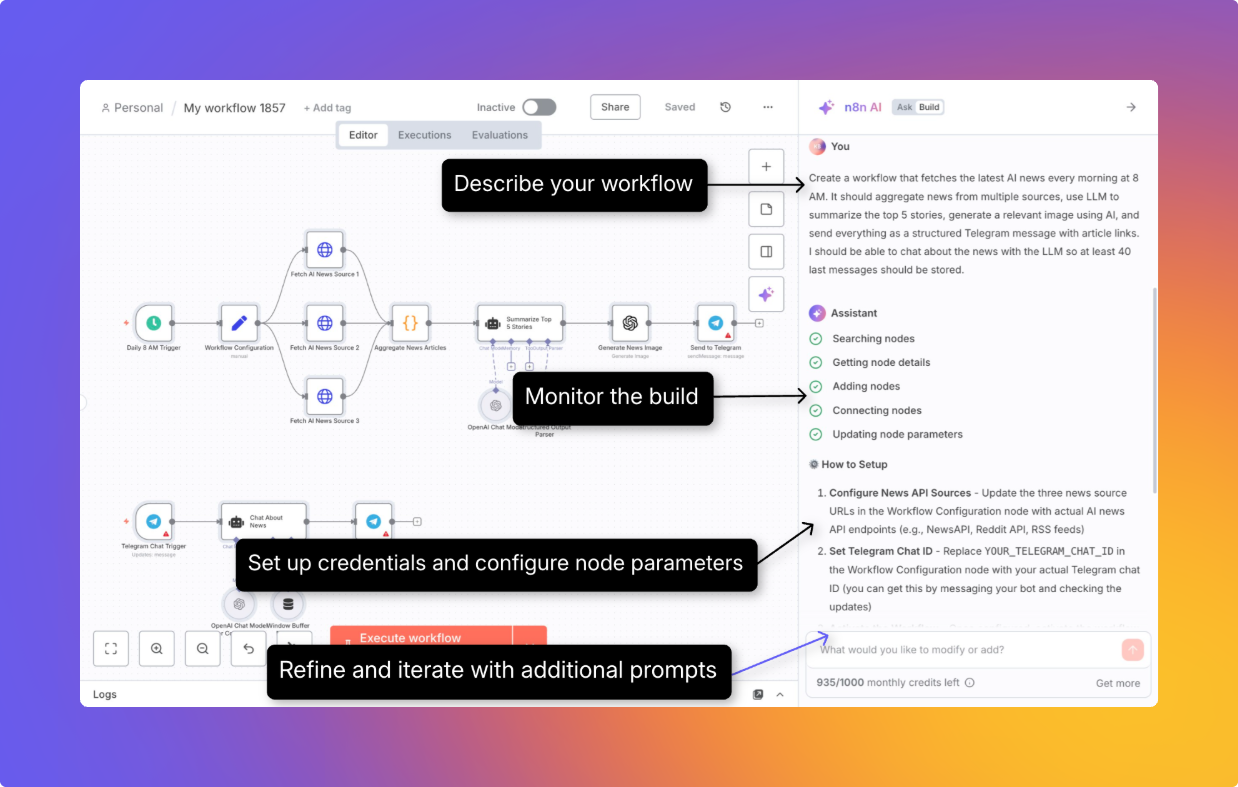
- Describe your workflow: Either select an example prompt or describe your requirements in natural language.
- Monitor the build: The builder provides real-time feedback through several phases.
- Review and refine the generated workflow: Review required credentials and other parameters. Refine the workflow using prompts.
Commands you can run in the builder
/clear: Clears the context for the LLM and lets you start from scratch
Understanding credits
How credits work
Each time you send a message to the builder asking it to create or modify a workflow, that counts as one interaction, which is worth one credit.
✅ Counts as an interaction
- Sending a message to create a new workflow
- Asking the builder to modify an existing workflow
- Clicking the Execute and refine button in the builder window after a workflow is built
❌ Does NOT count as an interaction
- Messages that fail or produce generation errors
- Requests you manually stop by clicking the stop button
Getting more credits
If you've used your monthly limit, you can upgrade to a higher plan.
For details on plans and pricing, see n8n Plans and Pricing.
AI model and data handling
The following data are sent to the LLM:
- Text prompts that you provide to create, refine, or debug the workflow
- Node definitions, parameters, and connections and the current workflow definition.
- Any mock execution data that is loaded when using the builder
The following data are not sent:
- Details of any credentials you use
- Past executions of the workflow
官方原文和授权
本页来自 N8N 英文官方网站固定快照,并转换成 xueai 静态页面。内容以 N8N 持续更新的官方页面为准。