构建工作流
Use AI for parameters
When configuring tools1 connected to the Tools Agent, many parameters can be filled in by the AI model itself. The AI model will use the context from the task and information from other connected tools to fill in the appropriate details.
There are two ways to do this, and you can switch between them.
Let the model fill in the parameter
Each appropriate parameter field in the tool's editing dialog has an extra button at the end:
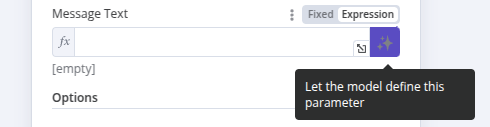
On activating this button, the AI Agent2 will fill in the expression for you, with no need for any further user input. The field itself is filled in with a message indicating that the parameter has been defined automatically by the model.
If you want to define the parameter yourself, click on the 'X' in this box to revert to user-defined values. Note that the 'expression' field will now contain the expression generated by this feature, though you can now edit it further to add extra details as described in the following section.
Use the $fromAI() function
The $fromAI() function uses AI to dynamically fill in parameters for tools connected to the Tools AI agent.
To use the $fromAI() function, call it with the required key parameter:
{{ $fromAI('email') }}The key parameter and other arguments to the $fromAI() function aren't references to existing values. Instead, think of these arguments as hints that the AI model will use to populate the right data.
For instance, if you choose a key called email, the AI Model will look for an email address in its context, other tools, and input data. In chat workflows, it may ask the user for an email address if it can't find one elsewhere. You can optionally pass other parameters like description to give extra context to the AI model.
Parameters
The $fromAI() function accepts the following parameters:
| Parameter | Type | Required? | Description |
|---|---|---|---|
key |
string | ✅ | A string representing the key or name of the argument. This must be between 1 and 64 characters in length and can only contain lowercase letters, uppercase letters, numbers, underscores, and hyphens. |
description |
string | ❌ | A string describing the argument. |
type |
string | ❌ | A string specifying the data type. Can be string, number, boolean, or json (defaults to string). |
defaultValue |
any | ❌ | The default value to use for the argument. |
Examples
As an example, you could use the following $fromAI() expression to dynamically populate a field with a name:
$fromAI("name", "The commenter's name", "string", "Jane Doe")If you don't need the optional parameters, you could simplify this as:
$fromAI("name")To dynamically populate the number of items you have in stock, you could use a $fromAI() expression like this:
$fromAI("numItemsInStock", "Number of items in stock", "number", 5)If you only want to fill in parts of a field with a dynamic value from the model, you can use it in a normal expression as well. For example, if you want the model to fill out the subject parameter for an e-mail, but always pre-fix the generated value with the string 'Generated by AI:', you could use the following expression:
Generated by AI: {{ $fromAI("subject") }}Templates
You can see the $fromAI() function in action in the following templates3:
- Angie, Personal AI Assistant with Telegram Voice and Text
- Automate Customer Support Issue Resolution using AI Text Classifier
- Scale Deal Flow with a Pitch Deck AI Vision, Chatbot and QDrant Vector Store
Footnotes
- Back
In an AI context, a tool is an add-on resource that the AI can refer to for specific information or functionality when responding to a request. The AI model can use a tool to interact with external systems or complete specific, focused tasks.
- Back
AI agents are artificial intelligence systems capable of responding to requests, making decisions, and performing real-world tasks for users. They use large language models (LLMs) to interpret user input and make decisions about how to best process requests using the information and resources they have available.
- Back
n8n templates are pre-built workflows designed by n8n and community members that you can import into your n8n instance. When using templates, you may need to fill in credentials and adjust the configuration to suit your needs.
官方原文和授权
本页来自 N8N 英文官方网站固定快照,并转换成 xueai 静态页面。内容以 N8N 持续更新的官方页面为准。